전반적인 절차는 아래의 공식문서를 따르면 된다. 하지만 하다보면 군데 군데 막힌다.
https://backstage.spotify.com/learn/standing-up-backstage/standing-up-backstage/1-intro/
Standing Up Backstage | Spotify for Backstage
Learn how to set up and deploy your Backstage app, how to add authentication, and how to connect to your source control system
backstage.spotify.com
막혔던 부분을 기록한다.
Creating the Backstage application
npx @backstage/create-app
우선 권장하는 Node 버전은 22이다. (24로 했을때 특정 Dependency에서 에러가 발생하였다.)
Setting up authentication
여기서 여러 오류를 겪었다.
1) Unknown auth provider 'github'
{
  "error": {
    "name": "NotFoundError",
    "message": "Unknown auth provider 'github'",
    "stack": "NotFoundError: Unknown auth provider 'github'\n    at <anonymous>  },
  "request": {
    "method": "GET",
    "url": "/github/start?scope=read%3Auser&origin=http%3A%2F%2Flocalhost%3A3000&flow=popup&env=development"
  },
  "response": {
    "statusCode": 404
  }
}
이 문제는 명시적으로 backend에서 add 해줌으로써 해결하였다.
/packages/backend/src/index.ts
backend.add(import('@backstage/plugin-auth-backend-module-github-provider'));
2) unable to resolve user identity
failed to sign-in, unable to resolve user identity. please verify that your catalog contains the expected user entities that would match your configured sign-in resolver.
이 문제는 인증을 마친 Github Account가 해당 Backstage 에서 대응하는 entity가 없을 경우에 발생한다.
해결방안은
auth.providers.github.development.signIn.resolvers를 추가한다.
/app-config.local.yaml
auth:
  # see https://backstage.io/docs/auth/ to learn about auth providers
  enviroment: development
  providers:
    github:
      development:
        clientId: ${CLIENT_ID}
        clientSecret: ${CLIENT_SECRET}
        signIn:
          resolvers:
            - resolver: usernameMatchingUserEntityName
`
그리고 example의 Group / User를 내 계정에 맞추어 업데이트 한다.
backstage-jpkim/examples/org.yaml
---
# https://backstage.io/docs/features/software-catalog/descriptor-format#kind-user
apiVersion: backstage.io/v1alpha1
kind: User
metadata:
  name: armyost
spec:
  memberOf: [admin]
---
# https://backstage.io/docs/features/software-catalog/descriptor-format#kind-group
apiVersion: backstage.io/v1alpha1
kind: Group
metadata:
  name: admin
spec:
  type: team
  children: []
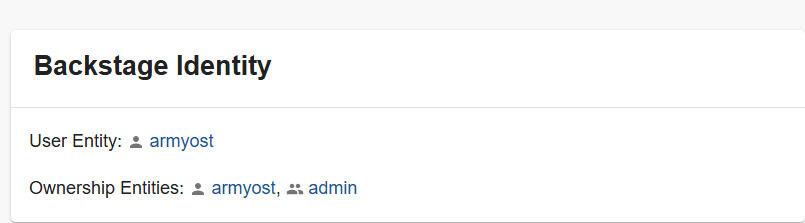
위 두 작업을 통해서 아래와 같이 Entity가 등록된 것을 확인할 수 있다.
'Programming > MSA' 카테고리의 다른 글
| Backstage) Install 4. TechDocs 에서 PlantUML Plugin 사용하기 (0) | 2025.12.01 |
|---|---|
| Backstage) Install 3. Theme 바꾸기 (1) | 2025.11.17 |
| Backstage) Install 1. Github App 설치 (0) | 2025.11.10 |
| Backstage) Internal Developer Portal 에 대해서 (0) | 2025.11.10 |
| Netflix ) Netflix’s Key-Value Data Abstraction Layer (0) | 2025.01.13 |